Ros2router short tutorial

Here you’ll find a ros2router tutorial that was a bit tailored towards the Competition. It may not be 100% applicable to the current setup as it was written a couple of setup-changes ago but we think that it still may be somewhat helpful.

Connecting to the On‑Site Participant VM from Your Laptop

System Architecture
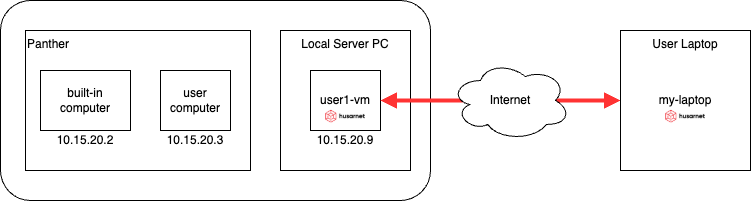
The diagram shows three key components:

  • user1-vm – your virtual machine running on the ERC on‑site network
  • Panther – the physical robot on the same on‑site LAN
  • my‑laptop – your personal computer, connected through Husarnet VPN

A ROS 2 Router (running in Docker on user1‑vm) forwards only selected topics between the on‑site LAN (enp6s19) and the Husarnet overlay network (hnet0).


1 Prepare the On‑Site VM (user1‑vm)

1.1 Tune the kernel for large DDS packets

# increase socket buffers
sudo sysctl -w net.core.wmem_max=12582912
sudo sysctl -w net.core.rmem_max=12582912
sudo sysctl -w net.core.wmem_default=16384000
sudo sysctl -w net.core.rmem_default=16384000

# avoid IP fragmentation issues
sudo sysctl -w net.ipv4.ipfrag_high_thresh=134217728   # 128 MB
sudo sysctl -w net.ipv4.ipfrag_time=3
sudo sysctl -w net.ipv6.ip6frag_high_thresh=134217728  # 128 MB
sudo sysctl -w net.ipv6.ip6frag_time=3

# adapt Husarnet interface
sudo ip link set dev hnet0 txqueuelen 500
sudo ip link set dev hnet0 mtu 1350

1.2 Start the ROS 2 Router container

Create compose.yaml in your home directory:

services:
  ros2router:
    image: husarnet/ros2router::1.10.3
    network_mode: host
    ipc: host
    volumes:
      - ./filter.yaml:/filter.yaml   # topic allow/deny list
    environment:
      - PARTICIPANTS=husarnet,if-enp6s19
      - ROS_DISCOVERY_SERVER=;;;husarnet-local
      - USER

default filter.yaml is generated automatically (see below) and can be edited whenever you want to adjust the topic list—remember to restart the container afterward.

Generate a filter that allows everything:

ros2 topic list | xargs ./create_filter.sh > filter.yaml

Launch the router:

docker compose up -d

1.3 Export the Fast DDS “super‑client” profile

docker compose exec ros2router cat /var/tmp/superclient.xml > ~/superclient.xml

You will copy this file to your laptop in the next phase.

1.4 Configure Cyclone DDS for local traffic

Save the following as ~/cyclonedds.xml:

<?xml version="1.0" encoding="utf-8"?>
<CycloneDDS xmlns="https://cdds.io/config" xmlns:xsi="http://www.w3.org/2001/XMLSchema-instance" xsi:schemaLocation="https://cdds.io/config https://raw.githubusercontent.com/eclipse-cyclonedds/cyclonedds/master/etc/cyclonedds.xsd">
  <Domain Id="any">
    <General>
      <Interfaces>
        <NetworkInterface name="enp6s19" />
      </Interfaces>
    </General>
  </Domain>
</CycloneDDS>

Apply it:

export RMW_IMPLEMENTATION=rmw_cyclonedds_cpp
export CYCLONEDDS_URI=$HOME/cyclonedds.xml
ros2 daemon stop      # forces re‑discovery

2 Prepare Your Laptop (my‑laptop)

2.1 Apply the same kernel tuning

Repeat the Tune the kernel commands from step 1.1:

# increase socket buffers
sudo sysctl -w net.core.wmem_max=12582912
sudo sysctl -w net.core.rmem_max=12582912
sudo sysctl -w net.core.wmem_default=16384000
sudo sysctl -w net.core.rmem_default=16384000

# avoid IP fragmentation issues
sudo sysctl -w net.ipv4.ipfrag_high_thresh=134217728   # 128 MB
sudo sysctl -w net.ipv4.ipfrag_time=3
sudo sysctl -w net.ipv6.ip6frag_high_thresh=134217728  # 128 MB
sudo sysctl -w net.ipv6.ip6frag_time=3

# adapt Husarnet interface
sudo ip link set dev hnet0 txqueuelen 500
sudo ip link set dev hnet0 mtu 1350

2.2 Enable Fast DDS with the router profile

Copy superclient.xml from user1‑vm to ~/superclient.xml on your laptop, then run:

export RMW_IMPLEMENTATION=rmw_fastrtps_cpp
export FASTRTPS_DEFAULT_PROFILES_FILE=$HOME/superclient.xml
ros2 daemon stop

After a few seconds you should discover every topic that the router exposes, giving you transparent access to Panther and the on‑site VM.


That’s it!
You can now launch your local ROS 2 nodes and interact with the on‑site robot just as if everything were on the same LAN.
2 Likes

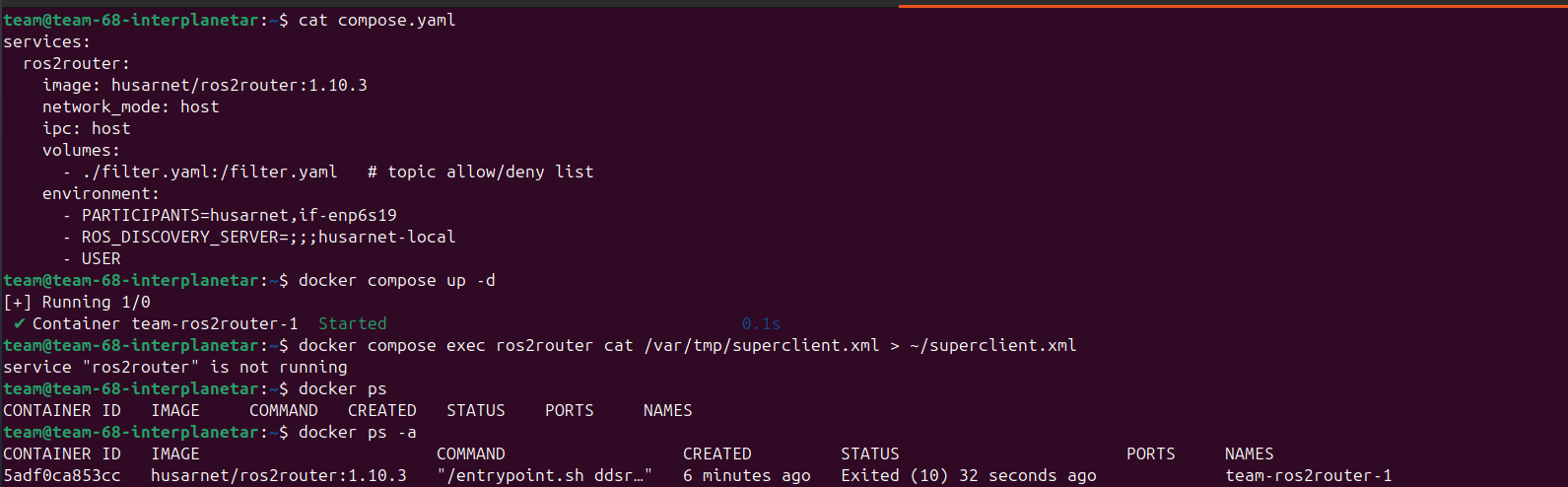
Facing issues with 1.10.3 ros2router image


The docker container automatically exits after few seconds
Any fixes?

Regards
Team Interplanetar

Hello, can you post docker compose logs ros2router and husarnet status here too?

BR,
Szymon

Heres the docker compose logs and husarnet status

team@team-68-interplanetar:~$ cat compose.yaml 
services:
  ros2router:
    image: husarnet/ros2router:1.10.3
    network_mode: host
    ipc: host
    volumes:
      - ./filter.yaml:/filter.yaml   # topic allow/deny list
    environment:
      - PARTICIPANTS=husarnet,if-enp6s19
      - ROS_DISCOVERY_SERVER=;;;husarnet-local
      - USER
team@team-68-interplanetar:~$ docker compose up -d
[+] Running 1/1
 ✔ Container team-ros2router-1  Started                                                                                                                                            0.2s 
team@team-68-interplanetar:~$ docker ps
CONTAINER ID   IMAGE     COMMAND   CREATED   STATUS    PORTS     NAMES
team@team-68-interplanetar:~$ docker compose logs ros2router
ros2router-1  | >> Husarnet participant enabled
ros2router-1  | Checking if Husarnet API (http://127.0.0.1:16216) is ready 
ros2router-1  | Husarnet API is ready!
ros2router-1  | Launching ROS Discovery Server config
ros2router-1  | Error: IPv6 address not found for husarnet-local
ros2router-1  | 2025-07-26 03:16:47.434 [DDSROUTER_ARGS Error] Option 'c' requires an existing readable file as argument. -> Function Readable_File
ros2router-1  | Usage: Fast DDS Router 
ros2router-1  | Connect different DDS networks via DDS through LAN or WAN.
ros2router-1  | It will build a communication bridge between the different Participants included in the provided configuration file.
ros2router-1  | To stop the execution gracefully use SIGINT (C^) or SIGTERM (kill) signals.
ros2router-1  | General options:
ros2router-1  | 
ros2router-1  | Application help and information.
ros2router-1  |   -h --help           Print this help message.
ros2router-1  |   -v --version        Print version, branch and commit hash.
ros2router-1  | 
ros2router-1  | Application parameters
ros2router-1  |   -c --config-path    Path to the Configuration File (yaml format) [Default: ./DDS_ROUTER_CONFIGURATION.yaml].
ros2router-1  |   -r --reload-time    Time period in seconds to reload configuration file. This is needed when FileWatcher functionality is not available (e.g. config file is a symbolic link). Value 0 does not reload file. [Default: 0].
ros2router-1  |   -t --timeout        Set a maximum time in seconds for the Router to run. Value 0 does not set maximum. [Default: 0].
ros2router-1  | 
ros2router-1  | Debug parameters
ros2router-1  |   -d --debug          Set log verbosity to Info                                                                                                                     
ros2router-1  |                                              (Using this option with --log-filter and/or --log-verbosity will head to undefined behaviour).
ros2router-1  |      --log-filter     Set a Regex Filter to filter by category the info and warning log entries. [Default = "DDSROUTER"]. 
ros2router-1  |      --log-verbosity  Set a Log Verbosity Level higher or equal the one given. (Values accepted: "info","warning","error" no Case Sensitive) [Default = "warning"]. 
ros2router-1  | 
ros2router-1  | 
team@team-68-interplanetar:~$ ping husarnet-local
PING husarnet-local (fc94:f96c:ac9a:bfd:7b64:fca5:b733:bcb2) 56 data bytes
64 bytes from husarnet-local (fc94:f96c:ac9a:bfd:7b64:fca5:b733:bcb2): icmp_seq=1 ttl=64 time=0.022 ms
64 bytes from husarnet-local (fc94:f96c:ac9a:bfd:7b64:fca5:b733:bcb2): icmp_seq=2 ttl=64 time=0.022 ms
64 bytes from husarnet-local (fc94:f96c:ac9a:bfd:7b64:fca5:b733:bcb2): icmp_seq=3 ttl=64 time=0.019 ms
64 bytes from husarnet-local (fc94:f96c:ac9a:bfd:7b64:fca5:b733:bcb2): icmp_seq=4 ttl=64 time=0.026 ms
^C
--- husarnet-local ping statistics ---
4 packets transmitted, 4 received, 0% packet loss, time 3091ms
rtt min/avg/max/mdev = 0.019/0.022/0.026/0.002 ms
team@team-68-interplanetar:~$ husarnet status
Dashboard
  URL:                       https://dashboard.beta.husarnet.com
  Claimed by:                erc@husarion.com
  Device known as:           team-68-interplanetar

This device
  Health:                    healthy
  User agent:                Husarnet,Linux,AMD64,2.0.322
  fc94:f96c:ac9a:0bfd:7b64:fca5:b733:bcb2

Peers
  fc94:90ea:bcdf:e73c:c3f3:c378:6453:f958 inactive, tunelled
  Hostnames: nahian

  fc94:14dd:4880:a05d:b8d5:91b5:255e:32db inactive, tunelled
  Hostnames: easy

  fc94:bc08:34b8:25c1:d685:402d:8ede:bb0f active, peer to peer
  Hostnames: abd-pc

  fc94:e2a3:0e1c:9d40:7fdf:9995:0e56:15a8 inactive, tunelled
  Hostnames: urbana-laptop

  fc94:e6c7:e201:c247:7243:bdc2:57cc:a233 inactive, tunelled
  Hostnames: husarion-ops

team@team-68-interplanetar:~$

Regards
Abdullah
Team Interplanetar

Issues I encountered with the husarnet/ros2router:1.10.3 Docker image:

Main Problem

The ROS2 router fails to start properly due to configuration generation errors, specifically with connection address parsing.

Things I tried

  1. Initial Setup with hostname reference:
  • Used ROS_DISCOVERY_SERVER=;;;husarnet-local
  • Error: “IPv6 address not found for husarnet-local”
  1. Tried using actual device hostname:
  • Used ROS_DISCOVERY_SERVER=;;;team-68-interplanetar
  • Error: “IPv6 address not found for team-68-interplanetar”
  1. Attempted direct IPv6 address without brackets:
  • Used ROS_DISCOVERY_SERVER=;;;fc94:f96c:ac9a:0bfd:7b64:fca5:b733:bcb2
  • Error: “ROS_DISCOVERY_SERVER does not have a valid format”
  1. Tried IPv6 address with proper brackets:
  • Used ROS_DISCOVERY_SERVER=;;;[fc94:f96c:ac9a:0bfd:7b64:fca5:b733:bcb2]:11811
  • Error: “fc94:f96c:ac9a:0bfd:7b64:fca5:b733:bcb2 address not found”
  1. Used peer hostname that exists in Husarnet network:
  • Used ROS_DISCOVERY_SERVER=;;;abd-pc (confirmed existing peer)
  • Configuration generated successfully, but…
  1. Network interface issues:
  • Initially tried if-enp6s19 (interface doesn’t exist)
  • Switched to if-eth0 (exists with IP 10.30.68.2)
  • Configuration generated correctly

Final Error

Even with correct configuration generation, the DDS router fails with:

Error Loading DDS Router Configuration from file /var/tmp/DDS_ROUTER_CONFIGURATION.yaml
Error reading yaml list under tag <connection-addresses>
Address requires to specify <ip> or <domain>

Root Cause Analysis

  1. The auto-configuration script successfully connects to Husarnet API
  2. It correctly resolves peer hostnames to IPv6 addresses
  3. It generates the YAML configuration file properly
  4. However, the DDS router itself fails to parse the generated configuration file, specifically the connection-addresses section

Recommendation for Organizers

There appears to be a bug in the DDS router configuration parser within the husarnet/ros2router:1.10.3 image. The auto-configuration script works correctly, but the underlying DDS router fails to parse its own generated configuration file. This suggests either:

  • A version mismatch between the configuration generator and the DDS router
  • A bug in the YAML parsing logic
  • Missing validation in the configuration schema

The issue is not with my setup or Husarnet connectivity, but with the internal configuration parsing within the Docker image itself.

Regards
Abdullah
Team Interplanetar

1 Like

Hi,

We have faced the exact same issues during our test. Removing the ROS_DISCOVERY_SERVER from the compose.yaml helps you to launch a DDS Router successfully thus enabling you to run the talker and listener script. So that seems to working, we tested that using the VM.

But there seems to be this issue with launching the Ros Discovery server with the exact same issues mentioned above, which needs to be fixed.

Criss Robotics

1 Like

Hi,

We don’t have certain permissions in order to execute the commands for tuning the kernel.

team@team-69-robocon:~$ # increase socket buffers
sudo sysctl -w net.core.wmem_max=12582912
sudo sysctl -w net.core.rmem_max=12582912
sudo sysctl -w net.core.wmem_default=16384000
sudo sysctl -w net.core.rmem_default=16384000

# avoid IP fragmentation issues
sudo sysctl -w net.ipv4.ipfrag_high_thresh=134217728   # 128 MB
sudo sysctl -w net.ipv4.ipfrag_time=3
sudo sysctl -w net.ipv6.ip6frag_high_thresh=134217728  # 128 MB
sudo sysctl -w net.ipv6.ip6frag_time=3

# adapt Husarnet interface
sudo ip link set dev hnet0 txqueuelen 500
sudo ip link set dev hnet0 mtu 1350
[sudo] password for team:
Sorry, user team is not allowed to execute '/usr/sbin/sysctl -w net.core.wmem_max=12582912' as root on team-69-robocon.

Team Robocon IITR

Any updates on the bug fixes?

Hello, I also encountered the issues described above, and after following the fixes proposed by Team Interplanetar and Criss Robotics in the posts above, topics can’t be received on the User laptop.

I also found a couple issues with the described setup:

  • The command ros2 topic list | xargs ./create_filter.sh > filter.yaml does not work as create_filter.sh file is not available or I didn’t find it.
  • Also the command docker compose exec ros2router cat /var/tmp/superclient.xml > ~/superclient.xml does not work and returns the error: cat: /var/tmp/superclient.xml: No such file or directory
  • If, as suggested by Criss Robotics above, the discovery server is removed I get:
    ros2router-1  | Error: bad file '-': yaml: block sequence entries are not allowed in this context
    ros2router-1  | Error: bad file '-': yaml: block sequence entries are not allowed in this context
    ros2router-1  | Error: bad file '-': yaml: block sequence entries are not allowed in this context
    ros2router-1  | ./config_daemon.sh: line 56: ((: i < : syntax error: operand expected (error token is "< ")
    

But the docker container seems to be running.

Hi

We are facing the same issues with the LIDAR and the ROS2Router as you described in the post

For Lidar as you reported we can only see the topics in Foxglove only I accidentally ran the echo command and when I saw after some time could only see 3 messages and now that also does not work )

also as ROS2Router is not working properly we can not forward the topics to out local machine and are not able to test anything properly

For the errors you mentioned for the curl command for the ./create_filter.sh you can use the command

curl -s https://raw.githubusercontent.com/husarnet/husarnet-ros2router/main/create_filter.sh > create_filter.sh
chmod +x create_filter.sh
./create_filter.sh /chatter /cmd_vel > filter.yaml

I found this while searching the ros2router github repo

Also this bash file would make a small mistake and not add

---

at the start of the file so you would have to do it yourself

Even after doing all these steps I am still getting the same error as you mentioned in the end of your message
I also had some other confusions in the tutorial

  • There seems to be already a cyclonedds.xml file present in the VM which is I believe for the communication between the Panther and the VM
  • Also right now the only way to set up the ROS2Router is by removing the Discovery Server but if we do that then we can not use the superclient.xml file provided
  • Even without the Discovery Server and running the ros2router docker container I cannot see the topics on my local machine

Aryan
CRISS Robotics

1 Like

Dear Organizers,
Please look into our issues and provide a solid way to connect our vm and local machine!

Regards
Abdullah
Team Interplanetar

In this commit (and in your home directory) you’ll find a couple of files helpful with your ros2router setup. (We’ve introduced some fixes here and there over the last couple of days, it’s only a resulting summary.)

The instructions are similar to what was published in the previous post (Ros2router short tutorial, but with some tweaks to make your life easier, namely:

  • there’s a decompressor compose file meant to be used on your local machine (i.e. not an on-site VM) - so you can copy it alongside your superclient.xml

  • there’s a ros2router directory in your home folder (some Teams already had one so we haven’t touched these) - with a compose config and updated filter/superclient generators

  • there’s an example filter config, with a list of topics you can expect from the robot

As per the usage instructions:

  • on your VM, cd ~/ros2router && docker compose up -d (network tweaks are already in place in case of a VM)

  • on your VM, docker compose exec ros2router cat /var/tmp/superclient.xml > ~/superclient.xml to generate a superclient.xml file containing your Husarnet IPv6 address

  • from your VM to your local machine, copy superclient.xml and compose.decompressor-ros2router.yaml files

  • on your local machine, apply networking tweaks:


# increase socket buffers

sudo sysctl -w net.core.wmem_max=12582912

sudo sysctl -w net.core.rmem_max=12582912

sudo sysctl -w net.core.wmem_default=16384000

sudo sysctl -w net.core.rmem_default=16384000

# avoid IP fragmentation issues

sudo sysctl -w net.ipv4.ipfrag_high_thresh=134217728 # 128 MB

sudo sysctl -w net.ipv4.ipfrag_time=3

sudo sysctl -w net.ipv6.ip6frag_high_thresh=134217728 # 128 MB

sudo sysctl -w net.ipv6.ip6frag_time=3

# adapt Husarnet interface

sudo ip link set dev hnet0 txqueuelen 500

sudo ip link set dev hnet0 mtu 1350

  • on your local machine, setup ROS (this can i.e. be added to .bashrc if you know what are you doing):

export RMW_IMPLEMENTATION=rmw_fastrtps_cpp

export FASTRTPS_DEFAULT_PROFILES_FILE=$HOME/superclient.xml

  • on your local machine, restart DDS ros2 daemon stop

  • on your local machine, docker compose -f compose.decompressor-ros2router.yaml up -d to start the decompressor

  • on your local machine - you now should have access to both the robot topics and the decompressed camera streams

1 Like

Hi ERC team

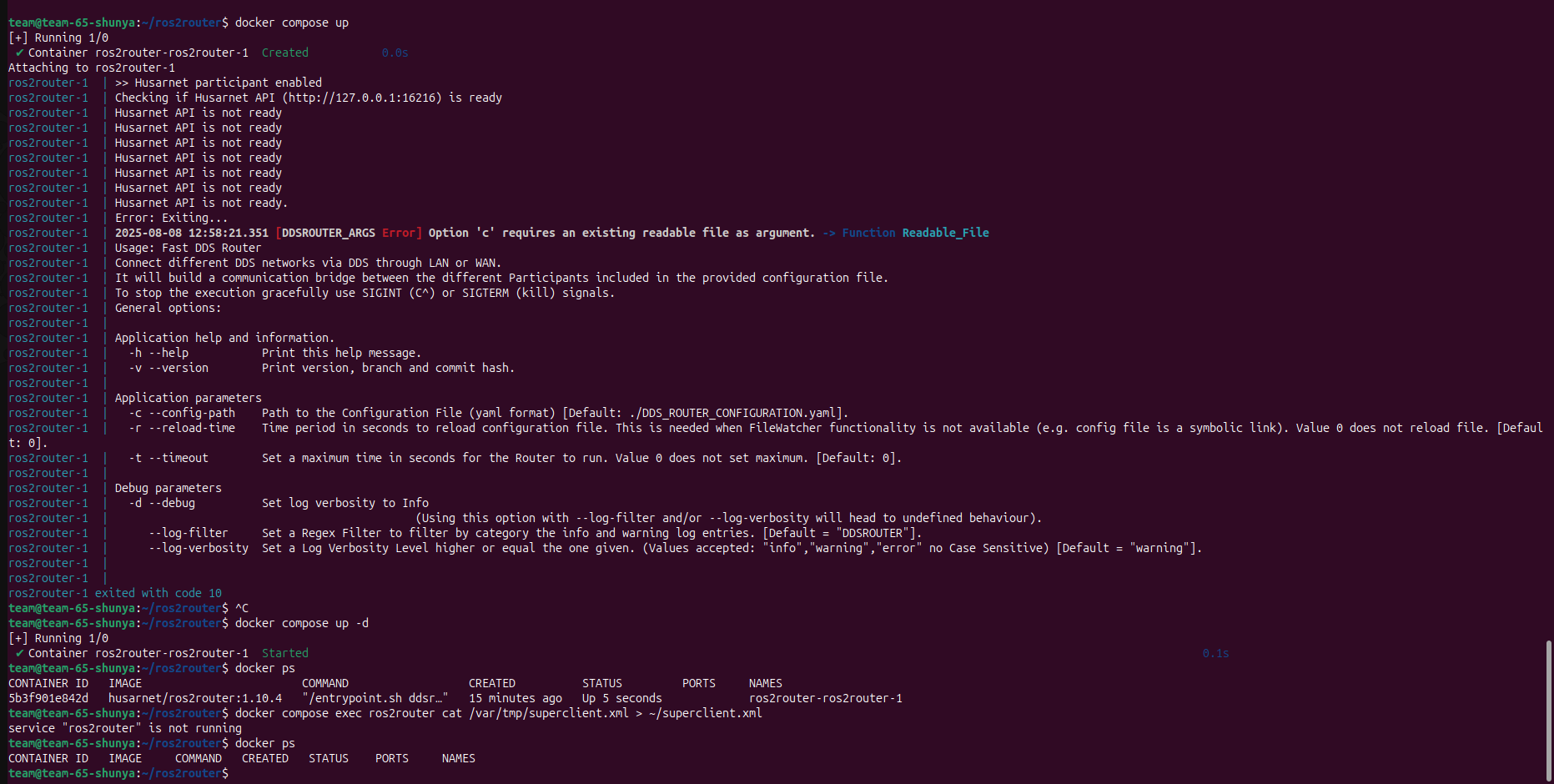
I’m trying to run husarnet/ros2router:1.10.4 via Docker Compose, but the container exits almost immediately with three problems: the logs keep showing “Husarnet API is not ready,” it reports Option 'c' requires an existing readable file as argument because DDS_ROUTER_CONFIGURATION.yaml is missing inside the container, and since it stops with code 10, docker compose exec fails saying the service is not running. Looking for advice on how to provide the config file, get Husarnet to initialize, and keep the container running.

Regards
Pavan
Team Shunya

Have you also updated the rest of the files from erc2025/ansible/roles/teams/files/ros2router at main · husarion/erc2025 · GitHub ? Especially - have you copied the filter_example.xml file in the right place?